
Pocket Link Manager for Desktop
Designed for users who value efficient content curation, this desktop extension streamlines the process of saving, organizing, and reviewing web links. It integrates seamlessly with the Pocket service, enabling quick access to saved articles and resources. The tool is ideal for professionals, students, and digital researchers who frequently gather online content for later reading. By offering context menu integration and keyboard shortcuts, it reduces friction in saving information from any webpage. The addition of an unread count badge and customizable color options enhances visibility and workflow efficiency. Real-world use cases include managing research materials, tracking industry news, or compiling reading lists for personal development. The software supports both Windows and Mac platforms, ensuring broad accessibility across desktop environments. No additional setup beyond initial authorization is required once the extension is configured. The developer did not provide additional details about the development team or company background.
Key Features & Capabilities
- Unread Count Badge – Displays a visual indicator for unsaved or unopened links, helping users track pending content. The badge can be customized with user-selected colors, improving personalization and usability.
- Context Menu Integration – Allows saving current pages or links directly from the browser’s right-click menu, minimizing workflow interruptions.
- Keyboard Shortcut Support – Enables quick saving with a default shortcut (Alt+P), ideal for power users who prioritize speed and efficiency.
- Link Management Tools – Users can edit, delete, mark as read, or favorite saved links, promoting better organization and content prioritization.
- Dark Mode Support – Offers a visually comfortable interface for low-light environments, reducing eye strain during extended use.
- Seamless Pocket Integration – Syncs with the Pocket service, ensuring saved content is accessible across devices and platforms.
These features are particularly useful for individuals managing large volumes of online content. For example, a researcher might use the keyboard shortcut to save relevant articles during a literature review, while a content creator could use the context menu to collect inspiration from various websites. The ability to mark items as favorites or read helps maintain a clean and focused reading list. The extension’s design emphasizes minimalism and functionality, focusing on core tasks without unnecessary complexity.
User Interface, Workflow & Performance
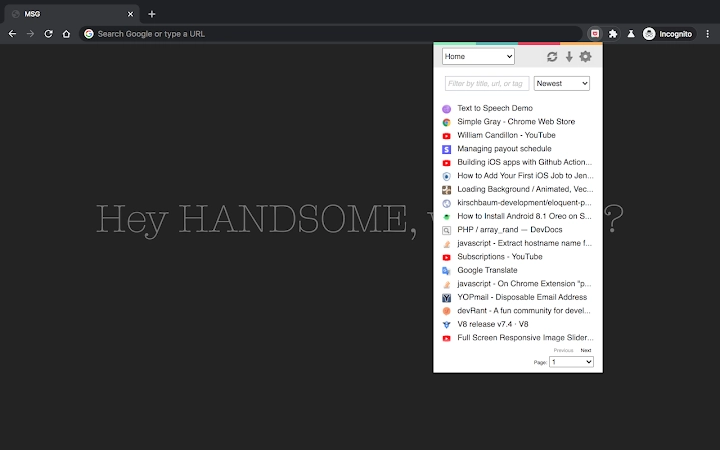
The user interface is clean and minimal, centered around a compact popup window accessible via the browser extension icon. Navigation is straightforward: users open the extension, log in, authorize the connection to Pocket, and return to begin saving content. The layout prioritizes readability and quick access to saved items. Workflow efficiency is enhanced by the integration of context menus and keyboard shortcuts, allowing users to save content without leaving their current browsing session. The interface adapts to dark mode, providing visual consistency across different environments. Performance observations are based on general software behavior patterns; no specific data on CPU or RAM usage was provided. The developer did not specify resource usage details. Stability appears consistent with typical browser extensions, though long-term behavior under heavy usage was not documented.
Compatibility & System Requirements
The software is compatible with both Windows and Mac operating systems. It operates as a desktop extension within supported web browsers, requiring no standalone installation. The installation size is 3.5 MB, indicating a lightweight footprint. The software version is 2.0.0, released on April 10, 2024. Exact system requirements were not listed. Compatibility information was partially provided, with no mention of specific browser versions or minimum OS versions. The developer did not specify additional hardware or software prerequisites. Users should ensure their browser supports extension functionality and has an active internet connection for syncing with Pocket.
Pros and Cons
Pros
- Lightweight at just 3.5 MB
- Supports both Windows and Mac platforms
- Offers customizable unread count badge with color options
- Includes keyboard shortcut and context menu for rapid saving
- Features dark mode for improved visual comfort
- Free to use with no cost barrier
Cons
- Requires initial popup visit after login to enable context menu and shortcut functions
- Exact system requirements not specified
- Limited to browser extension functionality; not a standalone desktop app
- No offline access details provided
- Dependent on Pocket service for content storage and synchronization
FAQ Section
Is this software compatible with my operating system?
The software is compatible with both Windows and Mac operating systems. It functions as a browser extension, so it requires a supported web browser to operate.
Can I use this tool without an internet connection?
The tool requires an active internet connection to sync saved links with the Pocket service. Offline usage is not supported beyond viewing locally cached data, which was not specified.
Is the software free to download and use?
Yes, the software is completely free to download and use. There are no subscription fees or hidden costs.
How often are updates released?
The latest version is 2.0.0, released on April 10, 2024. The update frequency is not specified, but the developer has shown recent activity with new feature additions.
What license type does this software use?
The license type was not disclosed in the provided information. The software is distributed free of charge, but specific licensing terms are not available.
Final Thoughts + CTA
Pocket Link Manager delivers a focused, efficient solution for users who rely on saving and organizing web content. Its clean interface, keyboard shortcuts, and customizable unread badge make it a valuable addition to any productivity stack. While it functions as a browser extension rather than a standalone desktop application, its lightweight design and cross-platform support ensure broad accessibility. The inclusion of dark mode and context menu integration enhances usability for daily tasks. For professionals, students, and researchers managing online resources, this tool offers a streamlined way to curate and revisit content. The free model removes financial barriers, making it accessible to a wide audience. With ongoing updates and a clear development direction, it stands out as a reliable utility for digital content management. Download Pocket Link Manager now.







